Backend

GraphQL API 설계와 최적화 완벽 가이드

GraphQL API를 설계하고 최적화하는 방법을 실전 예제와 함께 상세히 설명합니다. 스키마 설계, 리졸버 최적화, N+1 문제 해결, 캐싱 전략 등을 다룹니다.

GraphQL API 설계와 최적화 완벽 가이드

소개

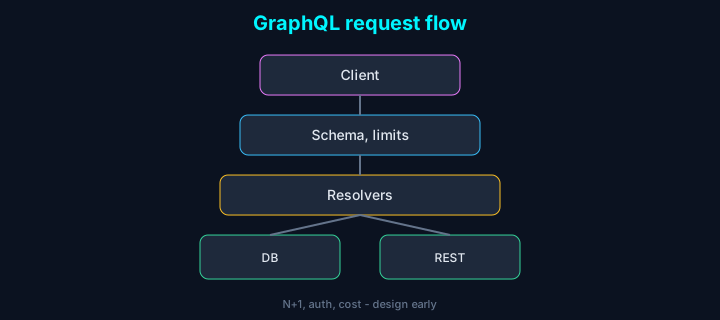
GraphQL은 클라이언트가 필요한 필드만 요청할 수 있어, 오버페칭·언더페칭이 잦은 REST보다 프론트와 맞추기 좋습니다. 다만 N+1·과도한 중첩은 성능을 쉽게 망가뜨립니다. 우리가 내부/파트너 API를 GraphQL로 설계하면서 겪은 트레이드오프와 최적화 방법을 실전 관점에서 정리했습니다.

GraphQL 기본 개념

스키마 정의

typescript
1import { buildSchema } from 'graphql';
2
3const schema = buildSchema(`
4  type User {
5    id: ID!
6    name: String!
7    email: String!
8    posts: [Post!]!
9    createdAt: DateTime!
10  }
11
12  type Post {
13    id: ID!
14    title: String!
15    content: String!
16    author: User!
17    comments: [Comment!]!
18    createdAt: DateTime!
19  }
20
21  type Comment {
22    id: ID!
23    content: String!
24    author: User!
25    post: Post!
26    createdAt: DateTime!
27  }
28
29  type Query {
30    user(id: ID!): User
31    users(limit: Int, offset: Int): [User!]!
32    post(id: ID!): Post
33    posts(limit: Int, offset: Int): [Post!]!
34  }
35
36  type Mutation {
37    createUser(input: CreateUserInput!): User!
38    updateUser(id: ID!, input: UpdateUserInput!): User!
39    deleteUser(id: ID!): Boolean!
40    createPost(input: CreatePostInput!): Post!
41  }
42
43  input CreateUserInput {
44    name: String!
45    email: String!
46    password: String!
47  }
48
49  input UpdateUserInput {
50    name: String
51    email: String
52  }
53
54  input CreatePostInput {
55    title: String!
56    content: String!
57    authorId: ID!
58  }
59
60  scalar DateTime
61`);

TypeScript와 GraphQL Code Generator

typescript
1// codegen.yml
2schema: http://localhost:4000/graphql
3documents: './src/**/*.graphql'
4generates:
5  ./src/generated/graphql.ts:
6    plugins:
7      - typescript
8      - typescript-operations
9      - typescript-react-apollo
graphql
1# src/queries/getUser.graphql
2query GetUser($id: ID!) {
3  user(id: $id) {
4    id
5    name
6    email
7    posts {
8      id
9      title
10      createdAt
11    }
12  }
13}

리졸버 구현

기본 리졸버

typescript
1import { GraphQLResolveInfo } from 'graphql';
2import { User, Post } from './models';
3
4const resolvers = {
5  Query: {
6    user: async (
7      parent: any,
8      args: { id: string },
9      context: any,
10      info: GraphQLResolveInfo
11    ) => {
12      return await User.findById(args.id);
13    },
14    
15    users: async (
16      parent: any,
17      args: { limit?: number; offset?: number },
18      context: any
19    ) => {
20      const limit = args.limit || 10;
21      const offset = args.offset || 0;
22      return await User.find()
23        .limit(limit)
24        .skip(offset);
25    }
26  },
27  
28  User: {
29    posts: async (parent: User) => {
30      return await Post.find({ authorId: parent.id });
31    }
32  },
33  
34  Post: {
35    author: async (parent: Post) => {
36      return await User.findById(parent.authorId);
37    },
38    
39    comments: async (parent: Post) => {
40      return await Comment.find({ postId: parent.id });
41    }
42  }
43};

N+1 문제 해결

DataLoader를 사용한 배칭

typescript
1import DataLoader from 'dataloader';
2import { User, Post } from './models';
3
4// User DataLoader
5const userLoader = new DataLoader<string, User>(async (userIds) => {
6  const users = await User.find({ _id: { $in: userIds } });
7  const userMap = new Map(users.map(user => [user.id, user]));
8  return userIds.map(id => userMap.get(id) || null);
9});
10
11// Post DataLoader
12const postLoader = new DataLoader<string, Post[]>(async (authorIds) => {
13  const posts = await Post.find({ authorId: { $in: authorIds } });
14  const postsByAuthor = new Map<string, Post[]>();
15  
16  for (const post of posts) {
17    const authorId = post.authorId.toString();
18    if (!postsByAuthor.has(authorId)) {
19      postsByAuthor.set(authorId, []);
20    }
21    postsByAuthor.get(authorId)!.push(post);
22  }
23  
24  return authorIds.map(id => postsByAuthor.get(id.toString()) || []);
25});
26
27// 리졸버에서 사용
28const resolvers = {
29  Post: {
30    author: async (parent: Post) => {
31      return await userLoader.load(parent.authorId);
32    }
33  },
34  
35  User: {
36    posts: async (parent: User) => {
37      return await postLoader.load(parent.id);
38    }
39  }
40};

커스텀 DataLoader

typescript
1class CustomDataLoader<K, V> extends DataLoader<K, V> {
2  constructor(
3    batchLoadFn: DataLoader.BatchLoadFn<K, V>,
4    options?: DataLoader.Options<K, V>
5  ) {
6    super(batchLoadFn, {
7      ...options,
8      cache: true,
9      maxBatchSize: 100
10    });
11  }
12  
13  // 캐시 무효화
14  clear(key: K): this {
15    return super.clear(key);
16  }
17  
18  // 전체 캐시 클리어
19  clearAll(): this {
20    this.clearAll();
21    return this;
22  }
23}

쿼리 복잡도 제한

typescript
1import { graphql } from 'graphql';
2import depthLimit from 'graphql-depth-limit';
3import { createComplexityLimitRule } from 'graphql-query-complexity';
4
5const complexityLimit = createComplexityLimitRule(1000, {
6  scalarCost: 1,
7  objectCost: 10,
8  listFactor: 10,
9  introspectionQueries: false
10});
11
12const validationRules = [
13  depthLimit(10),
14  complexityLimit
15];
16
17app.use('/graphql', graphqlHTTP({
18  schema,
19  rootValue: resolvers,
20  validationRules,
21  graphiql: true
22}));

필드 레벨 권한 제어

typescript
1import { GraphQLFieldResolver } from 'graphql';
2
3function requireAuth(resolver: GraphQLFieldResolver<any, any>) {
4  return async (parent: any, args: any, context: any, info: any) => {
5    if (!context.user) {
6      throw new Error('인증이 필요합니다');
7    }
8    return resolver(parent, args, context, info);
9  };
10}
11
12function requireRole(role: string) {
13  return (resolver: GraphQLFieldResolver<any, any>) => {
14    return async (parent: any, args: any, context: any, info: any) => {
15      if (!context.user) {
16        throw new Error('인증이 필요합니다');
17      }
18      if (context.user.role !== role && context.user.role !== 'admin') {
19        throw new Error('권한이 없습니다');
20      }
21      return resolver(parent, args, context, info);
22    };
23  };
24}
25
26const resolvers = {
27  Query: {
28    users: requireAuth(async (parent, args, context) => {
29      return await User.find();
30    }),
31    
32    adminData: requireRole('admin')(async (parent, args, context) => {
33      return await AdminData.find();
34    })
35  }
36};

캐싱 전략

필드 레벨 캐싱

typescript
1import { GraphQLResolveInfo } from 'graphql';
2import { createHash } from 'crypto';
3import Redis from 'ioredis';
4
5const redis = new Redis(process.env.REDIS_URL);
6
7function getCacheKey(info: GraphQLResolveInfo, args: any): string {
8  const fieldName = info.fieldName;
9  const parentType = info.parentType.name;
10  const argsHash = createHash('md5')
11    .update(JSON.stringify(args))
12    .digest('hex');
13  return `graphql:${parentType}:${fieldName}:${argsHash}`;
14}
15
16async function cachedResolver<T>(
17  resolver: () => Promise<T>,
18  info: GraphQLResolveInfo,
19  args: any,
20  ttl: number = 300
21): Promise<T> {
22  const cacheKey = getCacheKey(info, args);
23  
24  // 캐시 확인
25  const cached = await redis.get(cacheKey);
26  if (cached) {
27    return JSON.parse(cached);
28  }
29  
30  // 리졸버 실행
31  const result = await resolver();
32  
33  // 캐시 저장
34  await redis.setex(cacheKey, ttl, JSON.stringify(result));
35  
36  return result;
37}
38
39// 사용 예시
40const resolvers = {
41  Query: {
42    user: async (parent, args, context, info) => {
43      return cachedResolver(
44        () => User.findById(args.id),
45        info,
46        args,
47        600 // 10분
48      );
49    }
50  }
51};

HTTP 캐싱

typescript
1import { GraphQLResolveInfo } from 'graphql';
2import { setCacheControl } from 'graphql-cache-control';
3
4const resolvers = {
5  Query: {
6    user: setCacheControl({ maxAge: 300 })(async (parent, args) => {
7      return await User.findById(args.id);
8    }),
9    
10    posts: setCacheControl({ maxAge: 60, scope: 'PRIVATE' })(async (parent, args) => {
11      return await Post.find();
12    })
13  }
14};

서브스크립션 (Real-time)

typescript
1import { PubSub } from 'graphql-subscriptions';
2import { withFilter } from 'graphql-subscriptions';
3
4const pubsub = new PubSub();
5
6const resolvers = {
7  Subscription: {
8    postCreated: {
9      subscribe: withFilter(
10        () => pubsub.asyncIterator('POST_CREATED'),
11        (payload, variables) => {
12          // 필터링 로직
13          if (variables.authorId) {
14            return payload.postCreated.authorId === variables.authorId;
15          }
16          return true;
17        }
18      )
19    },
20    
21    commentAdded: {
22      subscribe: withFilter(
23        () => pubsub.asyncIterator('COMMENT_ADDED'),
24        (payload, variables) => {
25          return payload.commentAdded.postId === variables.postId;
26        }
27      )
28    }
29  },
30  
31  Mutation: {
32    createPost: async (parent, args, context) => {
33      const post = await Post.create(args.input);
34      
35      // 이벤트 발행
36      await pubsub.publish('POST_CREATED', {
37        postCreated: post
38      });
39      
40      return post;
41    }
42  }
43};

에러 처리

typescript
1import { GraphQLError } from 'graphql';
2
3class AppError extends Error {
4  constructor(
5    message: string,
6    public code: string,
7    public statusCode: number = 400
8  ) {
9    super(message);
10    this.name = 'AppError';
11  }
12}
13
14function formatError(error: GraphQLError) {
15  if (error.originalError instanceof AppError) {
16    return {
17      message: error.message,
18      code: error.originalError.code,
19      statusCode: error.originalError.statusCode
20    };
21  }
22  
23  // 프로덕션 환경에서는 상세 에러 숨김
24  if (process.env.NODE_ENV === 'production') {
25    return {
26      message: '내부 서버 오류가 발생했습니다',
27      code: 'INTERNAL_ERROR'
28    };
29  }
30  
31  return {
32    message: error.message,
33    locations: error.locations,
34    path: error.path,
35    extensions: error.extensions
36  };
37}
38
39app.use('/graphql', graphqlHTTP({
40  schema,
41  rootValue: resolvers,
42  graphiql: true,
43  customFormatErrorFn: formatError
44}));

성능 모니터링

typescript
1import { GraphQLResolveInfo } from 'graphql';
2
3function createMetricsResolver(resolver: any) {
4  return async (parent: any, args: any, context: any, info: GraphQLResolveInfo) => {
5    const start = Date.now();
6    const fieldName = info.fieldName;
7    const parentType = info.parentType.name;
8    
9    try {
10      const result = await resolver(parent, args, context, info);
11      const duration = Date.now() - start;
12      
13      // 메트릭 수집
14      metrics.recordTiming(`graphql.resolve.${parentType}.${fieldName}`, duration);
15      metrics.incrementCounter(`graphql.resolve.${parentType}.${fieldName}.success`);
16      
17      return result;
18    } catch (error) {
19      const duration = Date.now() - start;
20      metrics.recordTiming(`graphql.resolve.${parentType}.${fieldName}`, duration);
21      metrics.incrementCounter(`graphql.resolve.${parentType}.${fieldName}.error`);
22      throw error;
23    }
24  };
25}

결론

GraphQL API를 성공적으로 설계하고 최적화하기 위한 핵심 원칙:

  1. 명확한 스키마 설계: 타입과 관계를 명확히 정의
  2. N+1 문제 해결: DataLoader를 활용한 배칭
  3. 쿼리 복잡도 제한: 깊이와 복잡도 제한으로 DoS 방지
  4. 적절한 캐싱: 필드 레벨 캐싱으로 성능 향상
  5. 에러 처리: 일관된 에러 형식과 적절한 에러 메시지
  6. 성능 모니터링: 리졸버 성능 추적 및 최적화

이러한 전략들을 적용하면 확장 가능하고 효율적인 GraphQL API를 구축할 수 있습니다.

참고 자료

공유하기

관련 포스트