DevOps

Kubernetes 프로덕션 배포 완벽 가이드

Kubernetes에서 안정적이고 확장 가능한 애플리케이션을 배포하기 위한 실전 가이드. 리소스 관리, 헬스체크, 오토스케일링, 보안 설정 등을 상세히 다룹니다.

Kubernetes 프로덕션 배포 완벽 가이드

소개

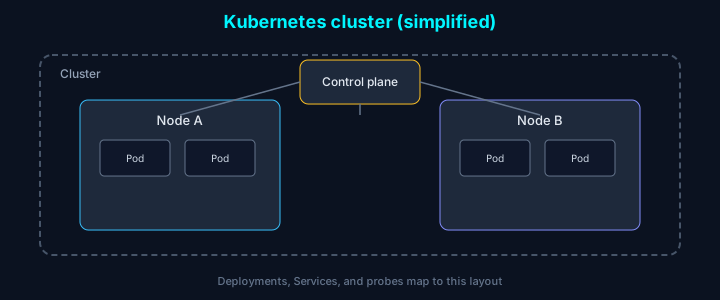
Kubernetes는 컨테이너 오케스트레이션의 사실상 표준이지만, YAML과 개념이 많아 처음엔 진입장벽이 높습니다. 우리가 프로덕션에 K8s를 도입하면서 리소스 요청/제한, 헬스체크, 롤링 업데이트를 어떻게 설정했는지 실전 예제 중심으로 정리했습니다.

기본 배포 설정

Deployment 리소스

yaml
1apiVersion: apps/v1
2kind: Deployment
3metadata:
4  name: web-app
5  labels:
6    app: web-app
7spec:
8  replicas: 3
9  selector:
10    matchLabels:
11      app: web-app
12  template:
13    metadata:
14      labels:
15        app: web-app
16    spec:
17      containers:
18      - name: web-app
19        image: web-app:1.0.0
20        ports:
21        - containerPort: 8080
22        env:
23        - name: DATABASE_URL
24          valueFrom:
25            secretKeyRef:
26              name: db-secret
27              key: url
28        resources:
29          requests:
30            memory: "256Mi"
31            cpu: "250m"
32          limits:
33            memory: "512Mi"
34            cpu: "500m"
35        livenessProbe:
36          httpGet:
37            path: /health
38            port: 8080
39          initialDelaySeconds: 30
40          periodSeconds: 10
41          timeoutSeconds: 5
42          failureThreshold: 3
43        readinessProbe:
44          httpGet:
45            path: /ready
46            port: 8080
47          initialDelaySeconds: 5
48          periodSeconds: 5
49          timeoutSeconds: 3
50          failureThreshold: 3

Service 리소스

yaml
1apiVersion: v1
2kind: Service
3metadata:
4  name: web-app-service
5spec:
6  selector:
7    app: web-app
8  ports:
9  - protocol: TCP
10    port: 80
11    targetPort: 8080
12  type: LoadBalancer

리소스 관리

Resource Requests와 Limits

yaml
1resources:
2  requests:
3    memory: "256Mi"
4    cpu: "250m"
5  limits:
6    memory: "512Mi"
7    cpu: "500m"

Best Practices:

  • Requests는 컨테이너가 보장받을 수 있는 최소 리소스
  • Limits는 컨테이너가 사용할 수 있는 최대 리소스
  • Requests와 Limits의 비율은 1:2 또는 1:4 권장

Resource Quota

yaml
1apiVersion: v1
2kind: ResourceQuota
3metadata:
4  name: compute-quota
5  namespace: production
6spec:
7  hard:
8    requests.cpu: "4"
9    requests.memory: 8Gi
10    limits.cpu: "8"
11    limits.memory: 16Gi
12    persistentvolumeclaims: "10"
13    pods: "20"

헬스체크 설정

Liveness Probe

애플리케이션이 살아있는지 확인합니다. 실패 시 컨테이너를 재시작합니다.

yaml
1livenessProbe:
2  httpGet:
3    path: /health
4    port: 8080
5    httpHeaders:
6    - name: Custom-Header
7      value: Awesome
8  initialDelaySeconds: 30
9  periodSeconds: 10
10  timeoutSeconds: 5
11  successThreshold: 1
12  failureThreshold: 3

Readiness Probe

애플리케이션이 트래픽을 받을 준비가 되었는지 확인합니다. 실패 시 Service에서 제거됩니다.

yaml
1readinessProbe:
2  exec:
3    command:
4    - cat
5    - /tmp/ready
6  initialDelaySeconds: 5
7  periodSeconds: 5

Startup Probe

느리게 시작하는 애플리케이션을 위한 프로브입니다.

yaml
1startupProbe:
2  httpGet:
3    path: /startup
4    port: 8080
5  failureThreshold: 30
6  periodSeconds: 10

오토스케일링

Horizontal Pod Autoscaler (HPA)

yaml
1apiVersion: autoscaling/v2
2kind: HorizontalPodAutoscaler
3metadata:
4  name: web-app-hpa
5spec:
6  scaleTargetRef:
7    apiVersion: apps/v1
8    kind: Deployment
9    name: web-app
10  minReplicas: 3
11  maxReplicas: 10
12  metrics:
13  - type: Resource
14    resource:
15      name: cpu
16      target:
17        type: Utilization
18        averageUtilization: 70
19  - type: Resource
20    resource:
21      name: memory
22      target:
23        type: Utilization
24        averageUtilization: 80
25  behavior:
26    scaleDown:
27      stabilizationWindowSeconds: 300
28      policies:
29      - type: Percent
30        value: 50
31        periodSeconds: 60
32    scaleUp:
33      stabilizationWindowSeconds: 0
34      policies:
35      - type: Percent
36        value: 100
37        periodSeconds: 15
38      - type: Pods
39        value: 2
40        periodSeconds: 15
41      selectPolicy: Max

Vertical Pod Autoscaler (VPA)

yaml
1apiVersion: autoscaling.k8s.io/v1
2kind: VerticalPodAutoscaler
3metadata:
4  name: web-app-vpa
5spec:
6  targetRef:
7    apiVersion: apps/v1
8    kind: Deployment
9    name: web-app
10  updatePolicy:
11    updateMode: "Auto"
12  resourcePolicy:
13    containerPolicies:
14    - containerName: web-app
15      minAllowed:
16        cpu: 100m
17        memory: 128Mi
18      maxAllowed:
19        cpu: 2
20        memory: 2Gi

배포 전략

Rolling Update

yaml
1spec:
2  strategy:
3    type: RollingUpdate
4    rollingUpdate:
5      maxSurge: 1
6      maxUnavailable: 0

Blue-Green 배포

yaml
1# Blue Deployment
2apiVersion: apps/v1
3kind: Deployment
4metadata:
5  name: web-app-blue
6spec:
7  replicas: 3
8  selector:
9    matchLabels:
10      app: web-app
11      version: blue
12  template:
13    metadata:
14      labels:
15        app: web-app
16        version: blue
17    spec:
18      containers:
19      - name: web-app
20        image: web-app:v1.0.0
21
22# Green Deployment
23apiVersion: apps/v1
24kind: Deployment
25metadata:
26  name: web-app-green
27spec:
28  replicas: 3
29  selector:
30    matchLabels:
31      app: web-app
32      version: green
33  template:
34    metadata:
35      labels:
36        app: web-app
37        version: green
38    spec:
39      containers:
40      - name: web-app
41        image: web-app:v1.1.0
42
43# Service (Blue를 가리킴)
44apiVersion: v1
45kind: Service
46metadata:
47  name: web-app-service
48spec:
49  selector:
50    app: web-app
51    version: blue  # Green으로 전환 시 이 값만 변경

Canary 배포

yaml
1# Stable Deployment (90%)
2apiVersion: apps/v1
3kind: Deployment
4metadata:
5  name: web-app-stable
6spec:
7  replicas: 9
8  selector:
9    matchLabels:
10      app: web-app
11      track: stable
12  template:
13    metadata:
14      labels:
15        app: web-app
16        track: stable
17    spec:
18      containers:
19      - name: web-app
20        image: web-app:v1.0.0
21
22# Canary Deployment (10%)
23apiVersion: apps/v1
24kind: Deployment
25metadata:
26  name: web-app-canary
27spec:
28  replicas: 1
29  selector:
30    matchLabels:
31      app: web-app
32      track: canary
33  template:
34    metadata:
35      labels:
36        app: web-app
37        track: canary
38    spec:
39      containers:
40      - name: web-app
41        image: web-app:v1.1.0

ConfigMap과 Secret 관리

ConfigMap

yaml
1apiVersion: v1
2kind: ConfigMap
3metadata:
4  name: app-config
5data:
6  app.properties: |
7    server.port=8080
8    logging.level=INFO
9    feature.flag.enabled=true
10  database.properties: |
11    pool.size=10
12    timeout=30s
13---
14apiVersion: apps/v1
15kind: Deployment
16spec:
17  template:
18    spec:
19      containers:
20      - name: web-app
21        envFrom:
22        - configMapRef:
23            name: app-config
24        volumeMounts:
25        - name: config
26          mountPath: /etc/config
27      volumes:
28      - name: config
29        configMap:
30          name: app-config

Secret

bash
1# Secret 생성
2kubectl create secret generic db-secret \
3  --from-literal=username=admin \
4  --from-literal=password=secretpassword \
5  --from-file=./tls.crt \
6  --from-file=./tls.key
yaml
1apiVersion: v1
2kind: Secret
3metadata:
4  name: db-secret
5type: Opaque
6data:
7  username: YWRtaW4=  # base64 encoded
8  password: c2VjcmV0cGFzc3dvcmQ=
9---
10apiVersion: apps/v1
11kind: Deployment
12spec:
13  template:
14    spec:
15      containers:
16      - name: web-app
17        env:
18        - name: DB_USERNAME
19          valueFrom:
20            secretKeyRef:
21              name: db-secret
22              key: username
23        - name: DB_PASSWORD
24          valueFrom:
25            secretKeyRef:
26              name: db-secret
27              key: password
28        volumeMounts:
29        - name: secrets
30          mountPath: /etc/secrets
31          readOnly: true
32      volumes:
33      - name: secrets
34        secret:
35          secretName: db-secret

네트워크 정책

yaml
1apiVersion: networking.k8s.io/v1
2kind: NetworkPolicy
3metadata:
4  name: web-app-policy
5spec:
6  podSelector:
7    matchLabels:
8      app: web-app
9  policyTypes:
10  - Ingress
11  - Egress
12  ingress:
13  - from:
14    - podSelector:
15        matchLabels:
16          app: nginx
17    - namespaceSelector:
18        matchLabels:
19          name: frontend
20    ports:
21    - protocol: TCP
22      port: 8080
23  egress:
24  - to:
25    - podSelector:
26        matchLabels:
27          app: database
28    ports:
29    - protocol: TCP
30      port: 5432
31  - to:
32    - namespaceSelector: {}
33    ports:
34    - protocol: TCP
35      port: 53
36    - protocol: UDP
37      port: 53

모니터링과 로깅

Prometheus 메트릭 수집

yaml
1apiVersion: v1
2kind: Service
3metadata:
4  name: web-app-metrics
5  annotations:
6    prometheus.io/scrape: "true"
7    prometheus.io/port: "9090"
8    prometheus.io/path: "/metrics"
9spec:
10  selector:
11    app: web-app
12  ports:
13  - name: metrics
14    port: 9090
15    targetPort: 9090

로그 수집 (Fluentd)

yaml
1apiVersion: v1
2kind: ConfigMap
3metadata:
4  name: fluentd-config
5data:
6  fluent.conf: |
7    <source>
8      @type tail
9      path /var/log/containers/*.log
10      pos_file /var/log/fluentd-containers.log.pos
11      tag kubernetes.*
12      read_from_head true
13      <parse>
14        @type json
15        time_key time
16        time_format %Y-%m-%dT%H:%M:%S.%NZ
17      </parse>
18    </source>
19    <match kubernetes.**>
20      @type elasticsearch
21      host elasticsearch.logging.svc.cluster.local
22      port 9200
23      logstash_format true
24    </match>

보안 Best Practices

Pod Security Policy

yaml
1apiVersion: policy/v1beta1
2kind: PodSecurityPolicy
3metadata:
4  name: restricted
5spec:
6  privileged: false
7  allowPrivilegeEscalation: false
8  requiredDropCapabilities:
9    - ALL
10  volumes:
11    - 'configMap'
12    - 'emptyDir'
13    - 'projected'
14    - 'secret'
15    - 'downwardAPI'
16    - 'persistentVolumeClaim'
17  hostNetwork: false
18  hostIPC: false
19  hostPID: false
20  runAsUser:
21    rule: 'MustRunAsNonRoot'
22  seLinux:
23    rule: 'RunAsAny'
24  fsGroup:
25    rule: 'RunAsAny'
26  readOnlyRootFilesystem: true

RBAC 설정

yaml
1apiVersion: v1
2kind: ServiceAccount
3metadata:
4  name: web-app-sa
5---
6apiVersion: rbac.authorization.k8s.io/v1
7kind: Role
8metadata:
9  name: web-app-role
10rules:
11- apiGroups: [""]
12  resources: ["pods"]
13  verbs: ["get", "list"]
14- apiGroups: [""]
15  resources: ["configmaps", "secrets"]
16  verbs: ["get"]
17---
18apiVersion: rbac.authorization.k8s.io/v1
19kind: RoleBinding
20metadata:
21  name: web-app-rolebinding
22subjects:
23- kind: ServiceAccount
24  name: web-app-sa
25roleRef:
26  kind: Role
27  name: web-app-role
28  apiGroup: rbac.authorization.k8s.io

결론

Kubernetes 프로덕션 배포를 성공적으로 수행하기 위한 핵심 사항:

  1. 적절한 리소스 관리: Requests와 Limits를 정확히 설정
  2. 강력한 헬스체크: Liveness, Readiness, Startup Probe 활용
  3. 자동 스케일링: HPA와 VPA로 리소스 최적화
  4. 안전한 배포: Rolling Update, Blue-Green, Canary 전략
  5. 보안 강화: Network Policy, RBAC, Pod Security Policy
  6. 모니터링: Prometheus와 로그 수집으로 가시성 확보

이러한 전략들을 조합하여 사용하면 안정적이고 확장 가능한 Kubernetes 환경을 구축할 수 있습니다.

참고 자료

공유하기

관련 포스트