웹 애플리케이션 보안 모범 사례 완벽 가이드
소개
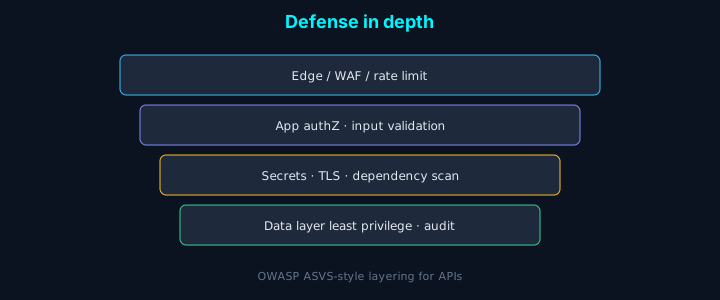
웹 애플리케이션 보안은 “나중에 하자”라고 미루다가 한 번 털리면 복구 비용이 커지는 영역입니다. OWASP Top 10을 기준으로, 우리가 서비스 배포 전에 꼭 점검하는 인증·인가·입력 검증·로그 설정 등을 코드 예제와 함께 정리했습니다.
OWASP Top 10 개요
2021년 OWASP Top 10 취약점:
- Broken Access Control
- Cryptographic Failures
- Injection
- Insecure Design
- Security Misconfiguration
- Vulnerable and Outdated Components
- Identification and Authentication Failures
- Software and Data Integrity Failures
- Security Logging and Monitoring Failures
- Server-Side Request Forgery (SSRF)
1. 인증 및 인가 (Authentication & Authorization)
강력한 비밀번호 정책
typescript
1import bcrypt from 'bcrypt';
2import { z } from 'zod';
3
4const passwordSchema = z.string()
5 .min(12, '비밀번호는 최소 12자 이상이어야 합니다')
6 .regex(/[A-Z]/, '대문자가 포함되어야 합니다')
7 .regex(/[a-z]/, '소문자가 포함되어야 합니다')
8 .regex(/[0-9]/, '숫자가 포함되어야 합니다')
9 .regex(/[^A-Za-z0-9]/, '특수문자가 포함되어야 합니다');
10
11async function hashPassword(password: string): Promise<string> {
12 const saltRounds = 12;
13 return await bcrypt.hash(password, saltRounds);
14}
15
16async function verifyPassword(
17 password: string,
18 hashedPassword: string
19): Promise<boolean> {
20 return await bcrypt.compare(password, hashedPassword);
21}JWT 토큰 관리
typescript
1import jwt from 'jsonwebtoken';
2import crypto from 'crypto';
3
4const JWT_SECRET = process.env.JWT_SECRET!;
5const REFRESH_TOKEN_SECRET = process.env.REFRESH_TOKEN_SECRET!;
6
7interface TokenPayload {
8 userId: string;
9 email: string;
10 role: string;
11}
12
13function generateAccessToken(payload: TokenPayload): string {
14 return jwt.sign(payload, JWT_SECRET, {
15 expiresIn: '15m',
16 issuer: 'your-app',
17 audience: 'your-app-users'
18 });
19}
20
21function generateRefreshToken(payload: TokenPayload): string {
22 return jwt.sign(payload, REFRESH_TOKEN_SECRET, {
23 expiresIn: '7d',
24 issuer: 'your-app',
25 audience: 'your-app-users'
26 });
27}
28
29function verifyToken(token: string): TokenPayload {
30 try {
31 return jwt.verify(token, JWT_SECRET) as TokenPayload;
32 } catch (error) {
33 throw new Error('Invalid token');
34 }
35}
36
37// 토큰 블랙리스트 관리
38class TokenBlacklist {
39 private blacklist = new Set<string>();
40
41 add(token: string, expiresIn: number) {
42 this.blacklist.add(token);
43 setTimeout(() => {
44 this.blacklist.delete(token);
45 }, expiresIn * 1000);
46 }
47
48 isBlacklisted(token: string): boolean {
49 return this.blacklist.has(token);
50 }
51}Rate Limiting
typescript
1import rateLimit from 'express-rate-limit';
2import RedisStore from 'rate-limit-redis';
3import Redis from 'ioredis';
4
5const redis = new Redis(process.env.REDIS_URL);
6
7// 로그인 시도 제한
8export const loginLimiter = rateLimit({
9 store: new RedisStore({
10 client: redis,
11 prefix: 'rl:login:'
12 }),
13 windowMs: 15 * 60 * 1000, // 15분
14 max: 5, // 최대 5번 시도
15 message: '너무 많은 로그인 시도가 있었습니다. 15분 후 다시 시도해주세요.',
16 standardHeaders: true,
17 legacyHeaders: false,
18});
19
20// API 요청 제한
21export const apiLimiter = rateLimit({
22 store: new RedisStore({
23 client: redis,
24 prefix: 'rl:api:'
25 }),
26 windowMs: 60 * 1000, // 1분
27 max: 100, // 최대 100번 요청
28 message: '너무 많은 요청이 있었습니다. 잠시 후 다시 시도해주세요.',
29});2. SQL Injection 방지
파라미터화된 쿼리
typescript
1import { Pool } from 'pg';
2
3const pool = new Pool({
4 connectionString: process.env.DATABASE_URL
5});
6
7// 나쁜 예: SQL Injection 취약
8async function getUserBad(email: string) {
9 const query = `SELECT * FROM users WHERE email = '${email}'`;
10 return pool.query(query);
11}
12
13// 좋은 예: 파라미터화된 쿼리
14async function getUserGood(email: string) {
15 const query = 'SELECT * FROM users WHERE email = $1';
16 return pool.query(query, [email]);
17}
18
19// ORM 사용 (TypeORM 예시)
20import { EntityRepository, Repository } from 'typeorm';
21import { User } from './entity/User';
22
23@EntityRepository(User)
24export class UserRepository extends Repository<User> {
25 async findByEmail(email: string): Promise<User | undefined> {
26 return this.findOne({ where: { email } });
27 }
28}입력 검증
typescript
1import { z } from 'zod';
2import { sanitize } from 'sanitize-html';
3
4const emailSchema = z.string().email();
5const usernameSchema = z.string()
6 .min(3)
7 .max(20)
8 .regex(/^[a-zA-Z0-9_]+$/, '영문, 숫자, 언더스코어만 사용 가능합니다');
9
10function sanitizeInput(input: string): string {
11 return sanitize(input, {
12 allowedTags: [],
13 allowedAttributes: {}
14 });
15}
16
17function validateAndSanitize<T>(
18 schema: z.ZodSchema<T>,
19 data: unknown
20): T {
21 const validated = schema.parse(data);
22 if (typeof validated === 'string') {
23 return sanitizeInput(validated) as T;
24 }
25 return validated;
26}3. XSS (Cross-Site Scripting) 방지
출력 인코딩
typescript
1import { escape } from 'html-escaper';
2
3// 서버 사이드 렌더링 시
4function renderUserContent(content: string): string {
5 return escape(content);
6}
7
8// React에서 자동 이스케이프
9function UserProfile({ name, bio }: { name: string; bio: string }) {
10 return (
11 <div>
12 <h1>{name}</h1> {/* 자동 이스케이프 */}
13 <p dangerouslySetInnerHTML={{ __html: sanitize(bio) }} />
14 </div>
15 );
16}Content Security Policy (CSP)
typescript
1import helmet from 'helmet';
2
3app.use(helmet.contentSecurityPolicy({
4 directives: {
5 defaultSrc: ["'self'"],
6 scriptSrc: ["'self'", "'unsafe-inline'", "https://trusted-cdn.com"],
7 styleSrc: ["'self'", "'unsafe-inline'"],
8 imgSrc: ["'self'", "data:", "https:"],
9 connectSrc: ["'self'"],
10 fontSrc: ["'self'"],
11 objectSrc: ["'none'"],
12 mediaSrc: ["'self'"],
13 frameSrc: ["'none'"],
14 },
15}));4. CSRF (Cross-Site Request Forgery) 방지
CSRF 토큰
typescript
1import csrf from 'csurf';
2import cookieParser from 'cookie-parser';
3
4app.use(cookieParser());
5app.use(csrf({ cookie: true }));
6
7app.get('/api/csrf-token', (req, res) => {
8 res.json({ csrfToken: req.csrfToken() });
9});
10
11app.post('/api/users', (req, res) => {
12 // CSRF 토큰 자동 검증
13 // 검증 실패 시 403 Forbidden
14 // 성공 시 요청 처리
15});SameSite Cookie
typescript
1app.use(session({
2 secret: process.env.SESSION_SECRET!,
3 cookie: {
4 secure: true, // HTTPS에서만 전송
5 httpOnly: true, // JavaScript에서 접근 불가
6 sameSite: 'strict', // CSRF 방지
7 maxAge: 24 * 60 * 60 * 1000 // 24시간
8 }
9}));5. 데이터 암호화
민감 정보 암호화
typescript
1import crypto from 'crypto';
2
3const ALGORITHM = 'aes-256-gcm';
4const KEY = crypto.scryptSync(process.env.ENCRYPTION_KEY!, 'salt', 32);
5
6function encrypt(text: string): { encrypted: string; iv: string; tag: string } {
7 const iv = crypto.randomBytes(16);
8 const cipher = crypto.createCipheriv(ALGORITHM, KEY, iv);
9
10 let encrypted = cipher.update(text, 'utf8', 'hex');
11 encrypted += cipher.final('hex');
12
13 const tag = cipher.getAuthTag();
14
15 return {
16 encrypted,
17 iv: iv.toString('hex'),
18 tag: tag.toString('hex')
19 };
20}
21
22function decrypt(encrypted: string, iv: string, tag: string): string {
23 const decipher = crypto.createDecipheriv(
24 ALGORITHM,
25 KEY,
26 Buffer.from(iv, 'hex')
27 );
28
29 decipher.setAuthTag(Buffer.from(tag, 'hex'));
30
31 let decrypted = decipher.update(encrypted, 'hex', 'utf8');
32 decrypted += decipher.final('utf8');
33
34 return decrypted;
35}HTTPS 강제
typescript
1// Express에서 HTTPS 리다이렉트
2app.use((req, res, next) => {
3 if (process.env.NODE_ENV === 'production') {
4 if (req.header('x-forwarded-proto') !== 'https') {
5 res.redirect(`https://${req.header('host')}${req.url}`);
6 } else {
7 next();
8 }
9 } else {
10 next();
11 }
12});6. 의존성 보안
취약점 스캔
bash
1# npm audit
2npm audit
3npm audit fix
4
5# Snyk 사용
6npm install -g snyk
7snyk test
8snyk monitor
9
10# OWASP Dependency-Check
11dependency-check --project "My Project" --scan ./package-lock.json자동 업데이트
json
1{
2 "scripts": {
3 "security:check": "npm audit --audit-level=moderate",
4 "security:fix": "npm audit fix",
5 "precommit": "npm run security:check"
6 },
7 "dependencies": {
8 "express": "^4.18.0" // ^를 사용하여 마이너 버전 자동 업데이트
9 }
10}7. 로깅 및 모니터링
보안 이벤트 로깅
typescript
1import winston from 'winston';
2
3const securityLogger = winston.createLogger({
4 level: 'info',
5 format: winston.format.json(),
6 transports: [
7 new winston.transports.File({ filename: 'security.log' })
8 ]
9});
10
11function logSecurityEvent(
12 event: string,
13 details: Record<string, any>
14) {
15 securityLogger.info({
16 timestamp: new Date().toISOString(),
17 event,
18 ...details,
19 ip: details.ip,
20 userAgent: details.userAgent
21 });
22}
23
24// 사용 예시
25logSecurityEvent('FAILED_LOGIN', {
26 email: 'user@example.com',
27 ip: req.ip,
28 userAgent: req.get('user-agent'),
29 reason: 'Invalid password'
30});이상 탐지
typescript
1class AnomalyDetector {
2 private loginAttempts = new Map<string, number[]>();
3
4 detectAnomaly(ip: string, event: string): boolean {
5 const now = Date.now();
6 const attempts = this.loginAttempts.get(ip) || [];
7
8 // 최근 5분간의 시도만 유지
9 const recentAttempts = attempts.filter(
10 time => now - time < 5 * 60 * 1000
11 );
12
13 recentAttempts.push(now);
14 this.loginAttempts.set(ip, recentAttempts);
15
16 // 5분간 10번 이상 시도 시 이상으로 판단
17 if (recentAttempts.length > 10) {
18 logSecurityEvent('ANOMALY_DETECTED', {
19 ip,
20 event,
21 attempts: recentAttempts.length
22 });
23 return true;
24 }
25
26 return false;
27 }
28}8. 파일 업로드 보안
typescript
1import multer from 'multer';
2import { extname } from 'path';
3
4const ALLOWED_EXTENSIONS = ['.jpg', '.jpeg', '.png', '.pdf'];
5const MAX_FILE_SIZE = 5 * 1024 * 1024; // 5MB
6
7const storage = multer.diskStorage({
8 destination: (req, file, cb) => {
9 cb(null, 'uploads/');
10 },
11 filename: (req, file, cb) => {
12 // 원본 파일명 사용하지 않고 안전한 이름 생성
13 const uniqueSuffix = Date.now() + '-' + Math.round(Math.random() * 1E9);
14 const ext = extname(file.originalname);
15 cb(null, `file-${uniqueSuffix}${ext}`);
16 }
17});
18
19const fileFilter = (req: any, file: Express.Multer.File, cb: any) => {
20 const ext = extname(file.originalname).toLowerCase();
21
22 if (!ALLOWED_EXTENSIONS.includes(ext)) {
23 return cb(new Error('허용되지 않은 파일 형식입니다'));
24 }
25
26 // MIME 타입 검증
27 const allowedMimes = [
28 'image/jpeg',
29 'image/png',
30 'application/pdf'
31 ];
32
33 if (!allowedMimes.includes(file.mimetype)) {
34 return cb(new Error('허용되지 않은 MIME 타입입니다'));
35 }
36
37 cb(null, true);
38};
39
40const upload = multer({
41 storage,
42 limits: {
43 fileSize: MAX_FILE_SIZE
44 },
45 fileFilter
46});결론
웹 애플리케이션 보안을 강화하기 위한 핵심 원칙:
- 입력 검증: 모든 사용자 입력 검증 및 정제
- 출력 인코딩: XSS 방지를 위한 적절한 인코딩
- 인증 강화: 강력한 비밀번호 정책 및 다단계 인증
- 암호화: 전송 중 및 저장 시 데이터 암호화
- 최소 권한: 필요한 최소한의 권한만 부여
- 보안 로깅: 보안 이벤트 모니터링 및 로깅
- 의존성 관리: 정기적인 취약점 스캔 및 업데이트
이러한 보안 모범 사례를 적용하면 웹 애플리케이션의 보안 수준을 크게 향상시킬 수 있습니다.