
HTML5 in production: essentials and how to use them
Key takeaway
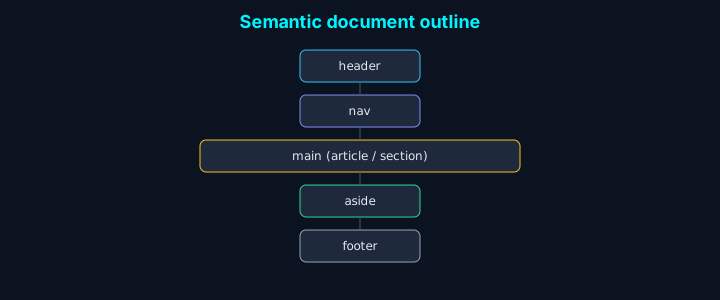
In one line: HTML5’s center of gravity is a semantic outline.
header,nav,main,article,section,aside, andfootergive you structure that helps SEO, accessibility, and maintenance at once.
| Area | Tag hints |
|---|---|
| Header & nav | header, nav |
| Main content | main, article, section |
Introduction
HTML5 raised the bar with semantics, forms, media, and APIs—but support still varies, so teams constantly ask “how far can we go?” Here’s what we rely on for landings, forms, and media pages, plus easy mistakes and checklists.
What changed with HTML5
-
Stronger semantic web
- Meaning-first tags structure documents
- Better SEO signals
- Better accessibility
-
Browser compatibility
- Broader cross-browser support
- Polyfills and feature detection
- Progressive enhancement
-
Performance and security
- Native media playback
- Stronger web security (CORS, CSP, etc.)
- Offline and caching primitives
-
Developer productivity
- Clearer APIs
- Rich devtools
- Extensible components
1. Major HTML5 features
| Feature | Description |
|---|---|
| Semantic tags | Meaningful elements (<header>, <nav>, <main>, <footer>, <article>, <section>, <aside>, etc.) |
| Multimedia | <audio>, <video>, <canvas>, <svg> without plugins |
| Forms | type="email" / date / number, required, pattern, placeholder, and more |
| APIs | Geolocation, Web Storage, Web Workers, WebSocket, WebGL, etc. |
| Mobile / responsive | Viewport, touch, media queries |
Semantic tags in depth
-
Document structure
<header>: intro for a page or section<nav>: primary navigation links<main>: main content (one per page)<article>: self-contained, distributable content<section>: thematic grouping<aside>: tangential content / sidebar<footer>: footer for page or section
-
Text-level semantics
<figure>/<figcaption>: media + caption<mark>: highlighted text<time>: dates and times<address>: contact information<em>: emphasis<strong>: strong importance
-
Practical example
-
Principles
- Keep the document outline clear
- Use tags for meaning, not only styling
- Structure for accessibility and SEO
- Respect nesting and hierarchy
- Logical reading order for screen readers
-
Why it helps
- Search engines parse content more reliably
- Screen readers get clearer landmarks
- Teammates read intent faster
- Easier maintenance and reuse
- Standards-based compatibility
2. Structure example
3. Multimedia and forms
Audio / video
Form enhancements
4. Checklists and optimization
4.1 Basics
- Document setup
- Semantic markup
- Use
<header>,<nav>,<main>,<article>,<section>,<aside>,<footer>appropriately - Keep
<h1>–<h6>hierarchy sensible - Use
<figure>/<figcaption>for illustrated content - Use
<time>,<address>, etc. where they fit
- Accessibility (WCAG 2.1)
- Alt text (or equivalent) for images
- Sufficient color contrast (aim ≥ 4.5:1 for body text)
- Full keyboard navigation
- ARIA labels/roles where native semantics aren’t enough
- Skip link to main content
- Performance
- Optimize images (WebP/AVIF where appropriate)
- Lazy-load non-critical resources
- Inline critical CSS when it helps
- Load non-critical JS asynchronously/deferred
- Define caching strategy
- Security
- HTTPS
- Content Security Policy
- CORS policy as needed
- XSS defenses
- CSRF tokens on state-changing requests
4.2 Advanced checklist
- Performance metrics (targets vary by product)
- First Contentful Paint (FCP) < ~1.8s
- Largest Contentful Paint (LCP) < ~2.5s
- First Input Delay (FID) < ~100ms
- Cumulative Layout Shift (CLS) < ~0.1
- Time to Interactive (TTI) < ~3.8s
- SEO
- Structured data where relevant
- Open Graph tags
- Twitter cards
- robots.txt
- sitemap.xml
- Browser support
- Cross-browser testing
- Polyfill strategy
- Feature detection
- Graceful degradation
- Mobile
- Responsive images
- Touch target sizes
- Viewport configuration
- Mobile-friendly typography
5. FAQ
Q1. HTML5 migration strategy?
Prefer incremental migration. Improve document structure with semantic tags first, then move forms and media to native HTML5, then layer Web Storage, service workers, and other APIs.
Q2. Semantic tags vs <div>?
Use semantic elements when they express structure or meaning. Reserve
<div>for styling/layout grouping without extra meaning—e.g.<article>for a blog post,<div>for a purely presentational wrapper.
Q3. Handling compatibility?
- Feature detection
- Polyfills when needed
Q4. Going PWA?
- HTTPS
- Service worker
- Web app manifest
- Offline strategy
- Push (optional)
Q5. Performance priorities?
- Critical rendering path
- Asset optimization (images, fonts)
- Caching
- Code splitting
- Lazy loading