
PostgreSQL read replicas: replication lag is not a bug—it is a contract (field notes)
Key takeaway
In one line: Before you funnel SELECTs to a replica, product and backend must agree how stale reads can be. Without that agreement, “data looks wrong sometimes” tickets never end.
| Question | If unanswered |
|---|---|
| Must a user see a write immediately? | Missing rows on replica → user reports |
| Can dashboards lag 30s? | Replicas can save cost and load |
| Balance right after payment? | Primary-only routing rules required |
Opening: “Replication is fine—why don’t I see it?”
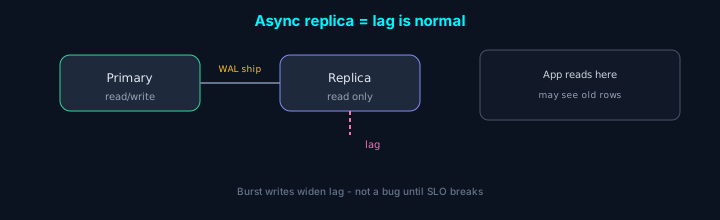
A familiar on-call pattern: “We just updated but the UI didn’t change.” Writes hit primary; reads habitually go to a read-only endpoint. PostgreSQL is not wrong—the app ignores the physical time gap of async replication.
On event and reward tables at itemSCV, reads-after-writes are common. We tried “replica only” first, then moved specific APIs back to primary more than once. This article captures the shared vocabulary and checklists from that work. Concepts apply whether you use managed RDS, AlloyDB, or self-hosted Postgres (February 2026 baseline).
Unless stated otherwise, this post assumes physical streaming replication (WAL). Logical replication and external CDC have different lag and consistency—do not reuse the same routing table blindly.
1. Why split reads in the first place?
The slogan is “reduce primary load,” but in practice you usually want one of:
- CPU/IO isolation: heavy analytics/reporting queries stop stealing OLTP disk and CPU
- Availability buffer: ties into failover/promotion stories (this post stays focused on read routing)
- Deploy/migrations: long read-only jobs on a replica
If you add replicas only because “SELECT feels slow” without handling lag, perceived quality can get worse.
1-1. Do not start with a replica when…
| Situation | Look here first |
|---|---|
| One query hogs primary | Plans, indexes, statistics (ANALYZE), partitioning |
| Connection count explodes | Pool sizing, idle timeouts, app leaks |
| Disk IO caps | Instance class, storage type, full-table scans |
A replica does not make a slow query fast. Offloading a slow query to a replica often stays slow and may fight replay.
2. Async means lag is a gap, not a failure
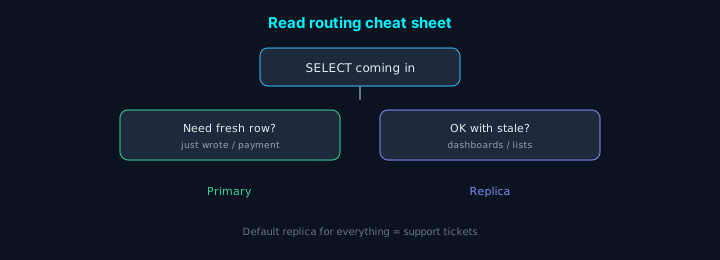
With typical streaming replication, the replica is a separate process catching up on WAL. Write bursts on primary leave the replica briefly behind. That is normal.
| Piece | One-liner |
|---|---|
| Primary | Writes WAL and ships it to standbys |
| Replica | Replays received WAL into data files |
| Lag | Time/bytes gap from ship vs replay speed |
The team’s job is not to wish for “zero lag” in slides, but to write down:
- Product SLO: e.g. “list views may lag up to N seconds”
- Routing rules: e.g. “user’s own resource reads go to primary” in code or middleware
Without that, the database always gets blamed.
synchronous_commit / sync standbys change write latency and availability—a different axis from “read staleness.” For read consistency, app routing usually comes first.
3. Common application-level compromises
A. “Just wrote—use primary” pattern
For a session, user, or order id, stick to primary for a short window after writes. Implementation varies (cookie, Redis flag, gateway header). The point is encoding who needs freshness for how long.
B. Read-only APIs on replica only
Dashboards, internal admin, batch reports—paths where slightly old data is OK—can stay on replica. If caches are involved, align cache TTL with lag SLO.
C. Pitfall inside a transaction
Reads after writes in the same transaction must use the same session and primary. Trying to read from a replica “in the same request” means the design is already wrong.
Right after COMMIT, some ORMs attach the next read to a replica connection even outside an explicit transaction block. Post-commit reads break RYW easily—make those paths explicitly primary.
D. ORM/router footguns
| Mistake | Outcome |
|---|---|
| “Read-only” flag still points at the same pool | You never hit replica |
| Lazy loads use the read connection | Rows “vanish” right after write in the UI |
| Batch jobs read-only on replica but drive decisions | Stale decisions without FOR UPDATE where needed |
In review, confirm two DSN strings exist and smoke tests run against both primary and replica.
4. Monitoring: don’t alarm on zero—alarm on SLO
For replicas I care less whether lag is exactly zero than whether it exceeds the N seconds we promised.
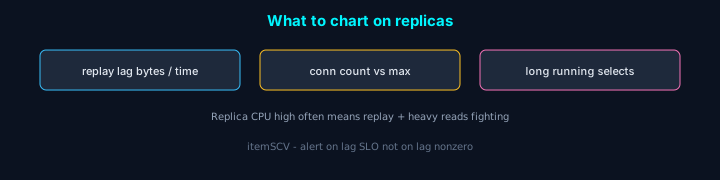
Metric names differ by platform; treat numbers as directional.
| Signal | Why it matters |
|---|---|
| Replay lag (time or bytes) | Early signal for write bursts, network, or disk |
| Replica connection count | Without pooling, the replica dies first |
| Long-running SELECTs | Tied to max_standby_streaming_delay / cancel behavior |
On primary, pair pg_stat_replication with replica-side recovery lag views/metrics to see where the bottleneck is.
Example on primary (session-level sanity; column names vary by version):
On the replica, receive vs replay LSN (check version/permissions):
If replay_queue_bytes stays large, suspect replay (CPU, disk, long queries/conflicts). Pair primary replay_lag_bytes with replica queue to split network vs replay bottlenecks.
4-1. Alerts: SLO and trend, not “non-zero”
| Anti-pattern | Prefer |
|---|---|
| Page if lag > 0 | Noise every burst; alerts get ignored |
| One fixed threshold forever | Meaningless after traffic grows |
| Watch only replica CPU | Lag can pile in WAL queue with idle CPU |
Alert when you breach the promised N seconds (or N MB), or when p95 worsens for several days.
Operators should read this as “how many times our SLO”, not “must always be zero”.
5. Hall of anti-patterns
- “All reads go to replica” → mystery logins for users who just signed up
- Lag alerts too tight → nightly pages people learn to ignore
- Heavy long queries on OLTP replica only → fighting replay
- Flip ORM to replica URL with no agreement → an hour-long blame game
- Expose sequences/counters directly → replica may disagree with primary on “next value” users see
- “Read-only batch” on replica without checking → temp tables,
COPY, some extensions are blocked or risky
| One-line symptom | Suspect |
|---|---|
| “Sometimes the row is missing” | RYW, cache, replica lag |
| “Only replica 5xx” | connection storm, conflict cancels, instance limits |
| “Only after migration” | wrong endpoint wiring, pool warm-up |
6. Sync replication in one line
“Can’t we just use synchronous commit?” That trades write latency and availability. Some financial flows justify it; most web stacks do better with app routing + async + SLO. Before enabling sync, re-measure write p99.
6-1. One-page API table—“which endpoint goes where?”
A single table ends a lot of meetings. Fictional e-commerce example:
| API / screen | Read target | Reason |
|---|---|---|
After POST /orders, GET /orders/:id | primary | Consistency right after payment/inventory |
| Product list, search | replica (30s SLO) | Spread load on traffic/cache miss |
| “My orders” first load | replica | Slight lag usually OK |
| Order detail right after checkout | primary or short RYW window | User expects what they just saw |
| Admin daily revenue rollup | replica + long timeout | Isolate OLTP IO |
Practice: keep this next to OpenAPI or in Notion and ask in PR review: “Can this SELECT hit replica?”
6-2. Read-your-writes—“primary for 5 seconds” pattern
Frameworks differ; the contract is the same: “For T seconds after a write, reads for that user/resource go to primary.”
| Approach | Pros | Caveats |
|---|---|---|
Session last_write_at + middleware | Simple | Clock skew, multi-tab, mobile concurrency |
Redis user:123:last_write TTL 10s | Fits stateless app tier | Fallback if Redis is down |
Response header X-Use-Primary-Until | Works with gateways | Needs client cooperation |
Set TTL around replication lag p99 + margin. “Forever primary” negates having a replica.
6-3. Replica-only failures—max_standby_streaming_delay
Long SELECTs on a replica can block WAL replay; Postgres may cancel queries (e.g. “canceling statement due to conflict with recovery”).
| Action | Notes |
|---|---|
| Long reports off peak or on a dedicated reporting replica | Cleanest split from OLTP replica |
Tune max_standby_streaming_delay | Raising without agreement can grow visible replication lag |
| Vacuum tuning | Old xmin can increase conflicts (workload-dependent) |
Review hot_standby_feedback | Old replica transactions can delay primary vacuum → bloat/conflicts—enable only with the tradeoff understood |
Practice: if “only replica is dying,” grep conflict cancel logs first. Primary fine + replica 5xx often matches this picture.
6-4. Connection pooling (PgBouncer, etc.) and replica URLs
If apps open a storm of connections to the replica, the replica dies while primary looks healthy.
| Check | Why |
|---|---|
| Pool on replica too | Whether numbackends hits instance limits |
| ORM “read-only” sessions use a real different DSN | Renaming config while still pointing at primary |
| Batch worker pool size | 500 connections from one box to replica ends badly |
Even with a managed reader endpoint, multiply app pool size by instance count and sanity-check totals.
6-5. On-call order when you suspect stale reads
| Step | Check |
|---|---|
| 1 | Which DSN the request used (logs/APM) |
| 2 | Whether primary vs replica replay lag breached SLO |
| 3 | Recent bulk writes, migrations, or vacuum |
| 4 | Cache TTL / CDN serving stale responses (don’t blame DB alone) |
| 5 | Whether post-write read paths match the table and code |
Skipping step 4 burns an hour on Postgres for nothing.
7. “Same DB, different plan?”—stats, bloat, and the planner
Replicas follow data, but planner statistics are not guaranteed identical to primary. Divergent ANALYZE timing or autovacuum can make the same query seq-scan on replica only.
| Check | Meaning |
|---|---|
EXPLAIN (ANALYZE, BUFFERS) on replica (careful with load) | If plan differs from primary, chase stats/config/cache |
| Table bloat / dead tuple ratio | Tied to replay, vacuum, and long-running queries |
Whether hot_standby_feedback is on | Can slow primary vacuum and indirectly hurt replica queries |
Practice: if “replica is slow” before blaming lag, diff execution plans once.
8. Failover, DNS, and reader endpoints
After managed failover, reader endpoints may point at a new instance. Apps can cling to old hosts because of DNS TTL and connection pool reuse.
| Check | Notes |
|---|---|
| Reader endpoint vs per-instance DNS | How failover is documented to behave |
| Pool idle timeout | Too long → stale sockets after promotion |
| App retries | Whether transient resets are absorbed |
Primary failover opens RPO/RTO discussions; read replicas also see traffic slamming the newly healthy node.
9. One-page checklist before you add a replica
- SLO: per-surface allowed lag (seconds/MB) is written down
- Routing table: APIs/batches marked primary / replica / conditional (RYW)
- On-call runbook: stale-read steps 1–5 + which log fields
- Monitoring: lag on both sides, connections, conflict cancel logs
- Pooling: PgBouncer or pool size vs instance
max_connections - Reporting/batch: separate reporting replica vs OLTP replica?
- Failover: at least one line on DNS, pools, and retry policy
Closing
A PostgreSQL read replica is less a performance switch than a switch that changes your consistency model. “Replicated” does not mean immediately readable; product must accept the gap.
For new projects, before adding a replica, write one page: which APIs use primary, which use replica, and allowed lag in seconds. Add RYW TTL, on-call order, and pool behavior on failover in a line each—that saves on-call rotations later.