Docker 프로덕션 환경 구축 완벽 가이드
소개
Docker는 컨테이너화 기술의 표준이 되었지만, “로컬에서는 되는데 배포에서 터진다”는 말을 여전히 자주 듣습니다. 우리도 여러 서비스를 Docker로 띄우면서 멀티스테이지 빌드, non-root 사용자, 이미지 크기 줄이기 등을 적용해 본 내용을 실전 관점에서 정리했습니다.
멀티스테이지 빌드
Node.js 애플리케이션
dockerfile
1# Build stage
2FROM node:18-alpine AS builder
3
4WORKDIR /app
5
6# 의존성 파일 복사
7COPY package*.json ./
8
9# 의존성 설치
10RUN npm ci --only=production && npm cache clean --force
11
12# 소스 코드 복사
13COPY . .
14
15# 빌드
16RUN npm run build
17
18# Production stage
19FROM node:18-alpine AS production
20
21WORKDIR /app
22
23# 보안을 위한 non-root 사용자 생성
24RUN addgroup -g 1001 -S nodejs && \
25 adduser -S nextjs -u 1001
26
27# 빌드된 파일만 복사
28COPY --from=builder --chown=nextjs:nodejs /app/.next ./.next
29COPY --from=builder --chown=nextjs:nodejs /app/node_modules ./node_modules
30COPY --from=builder --chown=nextjs:nodejs /app/package.json ./package.json
31COPY --from=builder --chown=nextjs:nodejs /app/public ./public
32
33USER nextjs
34
35EXPOSE 3000
36
37ENV NODE_ENV=production
38
39CMD ["npm", "start"]Python 애플리케이션
dockerfile
1# Build stage
2FROM python:3.11-slim AS builder
3
4WORKDIR /app
5
6# 시스템 의존성 설치
7RUN apt-get update && apt-get install -y \
8 gcc \
9 g++ \
10 && rm -rf /var/lib/apt/lists/*
11
12# Python 의존성 설치
13COPY requirements.txt .
14RUN pip install --user --no-cache-dir -r requirements.txt
15
16# Production stage
17FROM python:3.11-slim AS production
18
19WORKDIR /app
20
21# Non-root 사용자 생성
22RUN useradd -m -u 1000 appuser && chown -R appuser:appuser /app
23
24# 빌드된 의존성만 복사
25COPY --from=builder /root/.local /home/appuser/.local
26COPY --chown=appuser:appuser . .
27
28USER appuser
29
30ENV PATH=/home/appuser/.local/bin:$PATH
31ENV PYTHONUNBUFFERED=1
32
33EXPOSE 8000
34
35CMD ["gunicorn", "--bind", "0.0.0.0:8000", "app:app"]보안 Best Practices
.dockerignore 파일
node_modules
npm-debug.log
.git
.gitignore
.env
.env.local
.env.production
.DS_Store
*.md
.vscode
.idea
coverage
.nyc_output
최소 권한 원칙
dockerfile
1FROM node:18-alpine
2
3# Non-root 사용자 생성
4RUN addgroup -g 1001 -S appgroup && \
5 adduser -S appuser -u 1001 -G appgroup
6
7WORKDIR /app
8
9# 소유권 변경
10COPY --chown=appuser:appgroup . .
11
12USER appuser
13
14# 읽기 전용 파일 시스템
15RUN chmod -R 555 /app
16
17CMD ["node", "index.js"]시크릿 관리
bash
1# Docker Secrets 사용 (Docker Swarm)
2echo "my-secret-password" | docker secret create db_password -
3
4# docker-compose.yml
5version: '3.8'
6services:
7 app:
8 image: myapp:latest
9 secrets:
10 - db_password
11 environment:
12 - DB_PASSWORD_FILE=/run/secrets/db_password
13 secrets:
14 - source: db_password
15 target: db_password이미지 최적화
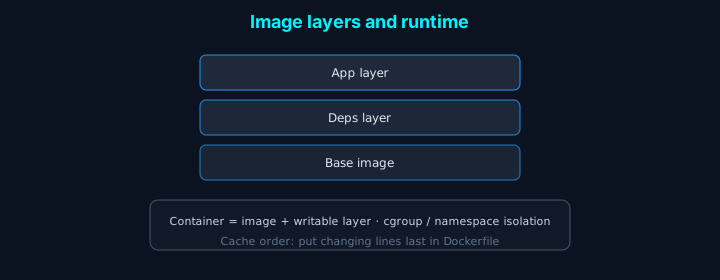
레이어 캐싱 최적화
dockerfile
1# 나쁜 예: 자주 변경되는 파일을 먼저 복사
2FROM node:18-alpine
3COPY . .
4RUN npm install
5
6# 좋은 예: 자주 변경되지 않는 파일을 먼저 복사
7FROM node:18-alpine
8COPY package*.json ./
9RUN npm ci --only=production
10COPY . .이미지 크기 최소화
dockerfile
1# Alpine Linux 사용
2FROM node:18-alpine
3
4# 불필요한 파일 제거
5RUN npm install --production && \
6 npm cache clean --force && \
7 rm -rf /tmp/* /var/tmp/*
8
9# 멀티스테이지 빌드로 최종 이미지 크기 최소화
10FROM node:18-alpine AS production
11COPY --from=builder /app/dist ./dist
12COPY --from=builder /app/node_modules ./node_modulesHealth Check
dockerfile
1FROM node:18-alpine
2
3HEALTHCHECK --interval=30s --timeout=3s --start-period=5s --retries=3 \
4 CMD node healthcheck.js || exit 1
5
6# 또는
7HEALTHCHECK --interval=30s --timeout=3s \
8 CMD curl -f http://localhost:3000/health || exit 1typescript
1// healthcheck.js
2const http = require('http');
3
4const options = {
5 host: 'localhost',
6 port: process.env.PORT || 3000,
7 path: '/health',
8 timeout: 2000
9};
10
11const request = http.request(options, (res) => {
12 console.log(`STATUS: ${res.statusCode}`);
13 if (res.statusCode === 200) {
14 process.exit(0);
15 } else {
16 process.exit(1);
17 }
18});
19
20request.on('error', (err) => {
21 console.log('ERROR:', err);
22 process.exit(1);
23});
24
25request.end();Docker Compose 프로덕션 설정
yaml
1version: '3.8'
2
3services:
4 app:
5 build:
6 context: .
7 dockerfile: Dockerfile.prod
8 target: production
9 image: myapp:latest
10 restart: unless-stopped
11 ports:
12 - "3000:3000"
13 environment:
14 - NODE_ENV=production
15 - DATABASE_URL=${DATABASE_URL}
16 env_file:
17 - .env.production
18 volumes:
19 - ./logs:/app/logs:ro
20 networks:
21 - app-network
22 depends_on:
23 - db
24 - redis
25 healthcheck:
26 test: ["CMD", "node", "healthcheck.js"]
27 interval: 30s
28 timeout: 10s
29 retries: 3
30 start_period: 40s
31 deploy:
32 resources:
33 limits:
34 cpus: '1'
35 memory: 512M
36 reservations:
37 cpus: '0.5'
38 memory: 256M
39
40 db:
41 image: postgres:15-alpine
42 restart: unless-stopped
43 environment:
44 - POSTGRES_DB=${DB_NAME}
45 - POSTGRES_USER=${DB_USER}
46 - POSTGRES_PASSWORD=${DB_PASSWORD}
47 volumes:
48 - postgres-data:/var/lib/postgresql/data
49 networks:
50 - app-network
51 healthcheck:
52 test: ["CMD-SHELL", "pg_isready -U ${DB_USER}"]
53 interval: 10s
54 timeout: 5s
55 retries: 5
56
57 redis:
58 image: redis:7-alpine
59 restart: unless-stopped
60 command: redis-server --appendonly yes
61 volumes:
62 - redis-data:/data
63 networks:
64 - app-network
65 healthcheck:
66 test: ["CMD", "redis-cli", "ping"]
67 interval: 10s
68 timeout: 3s
69 retries: 5
70
71 nginx:
72 image: nginx:alpine
73 restart: unless-stopped
74 ports:
75 - "80:80"
76 - "443:443"
77 volumes:
78 - ./nginx.conf:/etc/nginx/nginx.conf:ro
79 - ./ssl:/etc/nginx/ssl:ro
80 networks:
81 - app-network
82 depends_on:
83 - app
84
85volumes:
86 postgres-data:
87 redis-data:
88
89networks:
90 app-network:
91 driver: bridge모니터링 및 로깅
로그 드라이버 설정
yaml
1services:
2 app:
3 logging:
4 driver: "json-file"
5 options:
6 max-size: "10m"
7 max-file: "3"
8 labels: "production"Prometheus 메트릭 수집
yaml
1services:
2 app:
3 labels:
4 - "prometheus.scrape=true"
5 - "prometheus.port=9090"
6 - "prometheus.path=/metrics"
7
8 prometheus:
9 image: prom/prometheus:latest
10 volumes:
11 - ./prometheus.yml:/etc/prometheus/prometheus.yml
12 - prometheus-data:/prometheus
13 command:
14 - '--config.file=/etc/prometheus/prometheus.yml'
15 - '--storage.tsdb.path=/prometheus'
16 ports:
17 - "9090:9090"CI/CD 통합
GitHub Actions
yaml
1name: Build and Deploy
2
3on:
4 push:
5 branches: [main]
6
7jobs:
8 build:
9 runs-on: ubuntu-latest
10 steps:
11 - uses: actions/checkout@v3
12
13 - name: Set up Docker Buildx
14 uses: docker/setup-buildx-action@v2
15
16 - name: Login to Docker Hub
17 uses: docker/login-action@v2
18 with:
19 username: ${{ secrets.DOCKER_USERNAME }}
20 password: ${{ secrets.DOCKER_PASSWORD }}
21
22 - name: Build and push
23 uses: docker/build-push-action@v4
24 with:
25 context: .
26 push: true
27 tags: myapp:latest,myapp:${{ github.sha }}
28 cache-from: type=registry,ref=myapp:buildcache
29 cache-to: type=registry,ref=myapp:buildcache,mode=max
30
31 - name: Deploy to production
32 run: |
33 ssh user@server "docker-compose pull && docker-compose up -d"결론
Docker 프로덕션 환경을 성공적으로 구축하기 위한 핵심 원칙:
- 멀티스테이지 빌드: 최종 이미지 크기 최소화
- 보안 강화: Non-root 사용자, 최소 권한 원칙
- Health Check: 컨테이너 상태 모니터링
- 리소스 제한: CPU, 메모리 제한 설정
- 로깅 및 모니터링: 적절한 로그 드라이버와 메트릭 수집
- 자동화: CI/CD 파이프라인으로 배포 자동화
이러한 전략들을 적용하면 안정적이고 확장 가능한 Docker 프로덕션 환경을 구축할 수 있습니다.