
GA4 for marketers: how to use it without confusion in 2025
Key takeaway
In one line: GA4 is collection rules (events and parameters) first, not “reports.” If naming is messy, no report will save your marketing meetings.
| Common mistake | Do this instead |
|---|---|
| “Pageviews are enough” | Make conversions and intent explicit as key events |
| Everyone names events differently | Lock names to snake_case + one dictionary |
| Sloppy UTMs | Unify lowercase rules for source / medium / campaign |
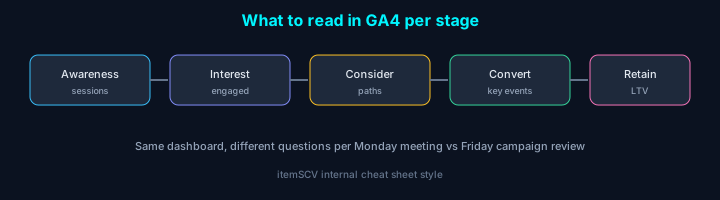
Why GA4 still sits at the center of marketing meetings
Honestly, when we migrated from UA around 2023, I thought it was “just a menu change.” Running campaigns proved that wrong—it’s closer to a model change. Sessions don’t line up in one neat story the way they used to; data stacks up in events.
At itemSCV, running landing pages, blog, and campaign URLs, GA4 is still the cheapest baseline (within the free tier). If Ads or Search Console speak to money and clicks, GA4 speaks to what happened on the site. Without connecting the two, questions like “ads look fine—why no leads?” stay unanswered.
This isn’t an engineer’s install manual. It’s framed around dashboards and questions marketers and PMs open weekly, plus checklists we actually use as of January 2026.
1. Mental model shifts from UA
In meetings, “check GA” often mixes GA4 reports with old UA instincts—that doubles confusion.
| Old habit (UA feel) | Reframe as a GA4 question |
|---|---|
| “Traffic dropped” | Active users? Sessions? (definitions differ) |
| “Views on this page” | Did views move with scroll / click signals? |
| “One conversion rate” | Which event counts as conversion—aligned across the team? |
We once caught a post where views rose but scroll events flatlined—great thumbnail/title, weak read-through. One number alone invites false confidence.
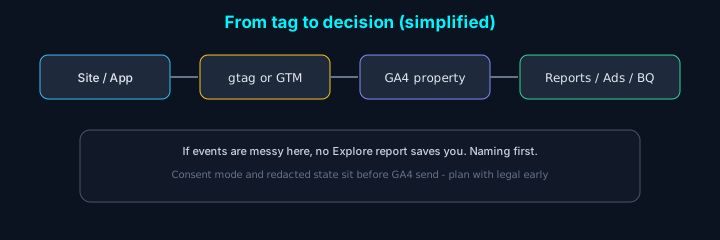
2. Event names: without a team doc, it breaks in three months
Whether you use GTM or gtag, GA4 ultimately receives event names and parameters. Compromise here and filter hell follows in Explore.
Our minimum rules:
- Lowercase + snake_case: e.g.
cta_click,form_submit. - Prefer verb_object:
view_item,generate_lead—meaning in the name. - One name per action. Don’t ship “click” vs “submit” ambiguity without agreement.
When marketing ran everything, it was easy to say “engineering will tag it.” Lock the conversion event list in one meeting—and pick key events for Ads from that same list.
Minimal dataLayer example (common shape for GTM custom events):
If campaign here differs from UTM, you split one campaign into multiple in reporting. Small issue, huge source of day-to-day breakage.
3. Treat UTMs like a clean spreadsheet
UTMs aren’t a creativity exercise—they’re record keeping. Internally, a sheet with just these columns speeds meetings:
| Field | Example rule | Notes |
|---|---|---|
| source | naver, google, newsletter | No mixed case or mixed scripts |
| medium | cpc, email, social | Separate paid vs organic |
| campaign | 2026q1_product_blog | Quarter + theme is enough |
What matters is one spelling convention. NewsLetter and newsletter become two rows in GA4. New hires should copy from the same sheet.
Real URL example (paste when emailing a blog launch):
https://itemscv.com/ko/blog/some-post?utm_source=newsletter&utm_medium=email&utm_campaign=2026q1_blog_launch
If you want Korean in campaign names, team rule “Roman characters only in URLs” reduces encoding glitches and Excel line breaks.
3-1. Scenario A — landing CTA A/B (GTM mental model)
Situation: /pricing has “Book demo” and “Talk to sales” side by side. PM only cares which line gets clicks.
| Step | Task |
|---|---|
| 1 | Give buttons stable ids, e.g. id="cta-demo", id="cta-sales" (one line with dev) |
| 2 | GTM trigger: Click — some links/buttons, Click ID equals cta-demo (duplicate for sales) |
| 3 | GA4 event tag: name cta_click, params cta_id = Click ID, page_path = {{Page Path}} |
In reporting: split cta_click by cta_id in Explore or custom reports. Pageviews alone won’t answer “which button won?” We once changed hero copy only and wasted a week without events.
3-2. Scenario B — form conversions polluted by bots
Situation: form_submit is a key event, but events spike at night while CRM stays empty.
Response order:
- Check if success fires only on the client. Prefer server-validated
generate_leadpushes (backend → dataLayer or Measurement Protocol per your stack). - Add honeypot + short reCAPTCHA; fire the event after pass.
- Split roles:
generate_leadfor real leads,cta_clickfor intent.
| Event | Meaning |
|---|---|
cta_click | Intent (top of funnel) |
generate_lead | Lead the server accepted (bottom of funnel) |
In marketing meetings, discussing ad efficiency on the latter only reduces fights.
3-3. Mini event dictionary template (copy to Notion/Sheet)
Keep columns; adapt to your org.
| event_name | When it fires | Required params | Key event? | Owner |
|---|---|---|---|---|
| page_view | (automatic) | - | N | - |
| cta_click | CTA click | cta_id, page_path | N | Mkt + FE |
| generate_lead | Server validation done | lead_type, campaign | Y | BE |
The Owner column is how you find who broke a tag later—not optional in practice.
4. Consent: sounds legal, but it hits marketing performance
In 2026, if collection is blocked, dashboards can look pretty close to zero. Even without EU traffic, domestic services still tie tags to privacy notices and marketing consent—decide how far tags fire.
From a marketer’s view:
- Ask for a demo of before vs after consent (full block vs anonymous signals).
- Know that turning on conversion optimization in Ads makes on-site signal quality more sensitive.
We won’t interpret law here. If campaign numbers look “off,” consider measurement dropped, not only “bad ads.”
5. Weekly rhythm: split Monday and Thursday
Checking everything daily burns people out. We roughly split:
Monday (direction)
- Sessions / active users vs prior week (especially when campaigns run)
- Channels with rising exit pages
- Above-the-fold scroll on new landings (if instrumented)
Thursday (action)
- Key event conversions or leads
- UTM campaigns vs cost (with Ads / media)
- Whether this week’s CTA changes show in click events
If Friday ends with “one experiment next week,” GA4 becomes an experiment log, not wallpaper.
6. BigQuery and Looker Studio: after the event dictionary, not before
Many teams expect “connect BQ and we’re done.” The pipe works; dirty source data just means longer SQL. We only started cohort and content-stay queries in BQ after cleaning the event dictionary.
Even without writing SQL, one sentence of “what we’d move to BQ” speeds talks with data: e.g. “Of users from campaign X, conversion rate for those who read 3+ blog posts.”
7. When numbers look wrong — debugging order
When “conversions halved” after a deploy, panic is natural. This sequence narrows cause faster:
| Order | Check | Example read |
|---|---|---|
| 1 | GA4 DebugView or Tag Assistant: events arriving? | If not, tag/GTM deploy issue |
| 2 | Overlap with consent banner / CMP changes | Higher rejections → reporting only |
| 3 | Data stream filters (internal IP, etc.) | New office IP excluded |
| 4 | Self-referral / payment or OAuth referrers | Sessions split; source skews to (direct) |
| 5 | Dev running production GA ID locally | Test traffic mixed in |
Domain lists: payment gateways and OAuth domains often need cross-domain / referral configuration, not “exclude referrer” guesses. Often it’s session definition changed, not “GA is broken.”
8. Three common Explore questions (draft)
Perfect paths differ per site—take the question wording:
- “This month, what share of paid-campaign sessions reached
generate_lead?”
→ Segment by campaign; funnel exploration. - “Users who first visited the blog and requested a demo within 7 days?” (needs stable user id)
→ BQ / CRM join assumptions. - “Landing A vs B: share of sessions with 75% scroll?”
→ Moves content debates off pure gut feel.
Closing
Complaints about GA4’s UI are fair. The event-based shift also reflects a more complex web—forms, video, and chat on one page mean a single pageview isn’t enough.
One point above all: before pretty reports, agree you’re counting the same things with the same names. Miss that and 2026 meetings still end on “the GA numbers look weird.”
If you have gaps or edge cases from your live site, we can fold them into a future update.